Friday, October 3, 2014

What is Data Dictionary?


Definition:
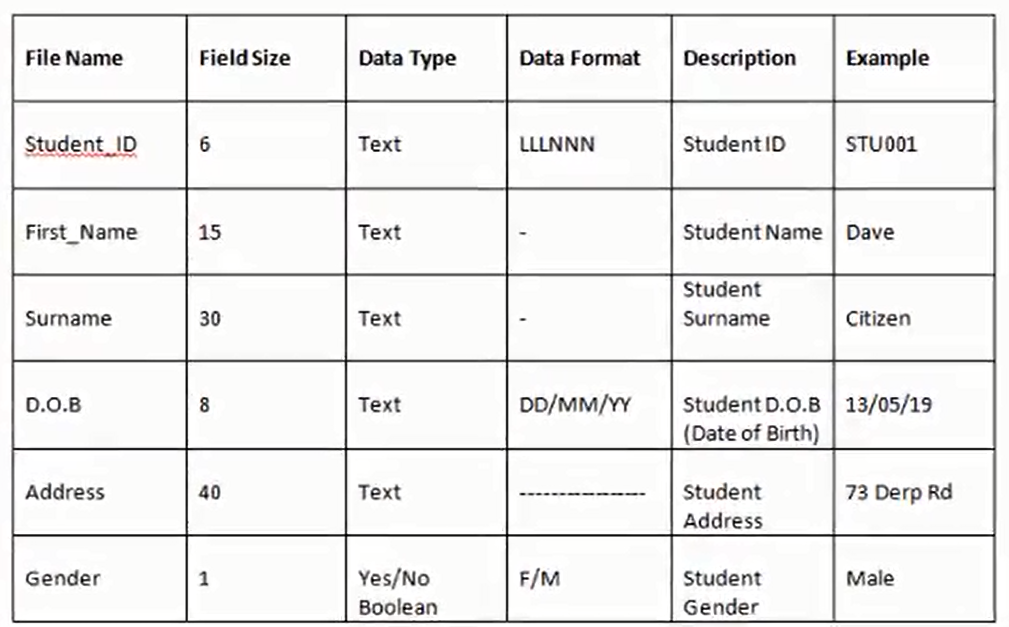
A data dictionary is a comprehensive description of each field in a database. It contains information about the characteristics of each item entered in the database, such as the field names, data types, field sizes and field descriptions.

Components of data dictionary:
  • Field name
  • Data type
  • Field size
  • Description

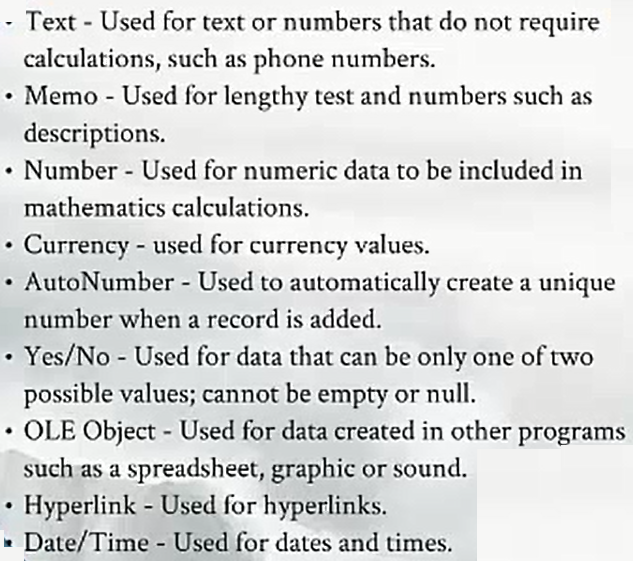
Data types:


Example:


More on Data Dictionary: [Ref: Oracle's website ]
-Is a read-only set of tables that provides information about the database. A data dictionary contains:

  • The definitions of all schema objects in the database (tables, views, indexes, clusters, synonyms, sequences, procedures, functions, packages, triggers, and so on)
  • How much space has been allocated for, and is currently used by, the schema objects
  • Default values for columns
  • Integrity constraint information
  • The names of Oracle users
  • Privileges and roles each user has been granted
  • Auditing information, such as who has accessed or updated various schema objects
  • Other general database information

The data dictionary is structured in tables and views, just like other database data. All the data dictionary tables and views for a given database are stored in that database's SYSTEM tablespace.

Not only is the data dictionary central to every Oracle database, it is an important tool for all users, from end users to application designers and database administrators. Use SQL statements to access the data dictionary. Because the data dictionary is read-only, you can issue only queries (SELECT statements) against it's tables and views.

SQL server table data dictionary:
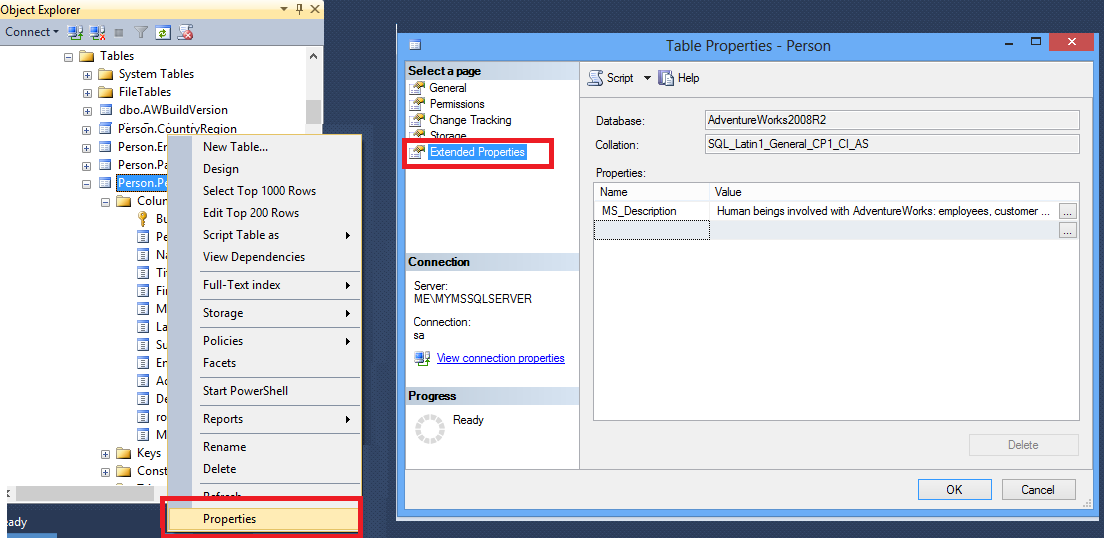

Ref:
AdventureWorks Data Dictionary [Link]

Monday, September 29, 2014

Data ware house


Sample database diagram


AdventureWork2008R2 Database Schema


Common terms

Pages

SQL Server data page with row offsets
  • fundamental unit of data storage in SQL Server is the page
  • The disk space allocated to a data file (.mdf or .ndf) in a database is logically divided into pages numbered contiguously from 0 to n. Disk I/O operations are performed at the page level. That is, SQL Server reads or writes whole data pages.


Extents
Extents are a collection of eight physically contiguous pages and are used to efficiently manage the pages. All pages are stored in extents.

SQL Server - Group By Example

Common rule:


  1. columns without aggregate function, must have to add into GROUP BY clause
  2. to filter by aggregate value, have to use having & agg. columns based on requirements

Derived column / Calculated Column:


The Derived Column transformation creates new column values by applying expressions to transformation input columns. An expression can contain any combination of variables, functions, operators, and columns from the transformation input.

SQL Server code:


select sh.TerritoryID
   ,sh.CustomerID
   ,sh.DueDate
   ,sum(sh.TaxAmt) totalTax
   ,sum(sh.SubTotal) totalSales
from Sales.SalesOrderHeader sh
where sh.TerritoryID in (4,5,6) and
  YEAR(sh.DueDate)='2006' and   MONTH(sh.DueDate) = '6' and
  datepart(YY, DueDate) = '2006' and --datepart
  DATEDIFF(mm, '2006-06-01', DueDate) = 0
group by sh.TerritoryID, sh.CustomerID, sh.DueDate
having sum(sh.SubTotal) > 10000 and
  sum(sh.SubTotal) > 4000  --alias doesn't support
--order by sh.SubTotal desc, sh.TaxAmt desc
order by 4 desc, 3 desc

Table:


SQL Server - Subquery

Tips:


All tasks of sub-query can be replaced with SQL server JOIN. So, it is recommend to use JOIN. But learn sub-query for understanding.

Careful:


  • does not support ORDER BY
  • You can’t use BETWEEN in the main query. But sub-query allows BETWEEN.
  • sub-query is a filter. so, inside sub-query, you can’t use more than one column

SQL Server code:


-- find the personal details using the phone number

select BusinessEntityID
from   Person.PersonPhone
where  PhoneNumber='612-555-0100'

select FirstName, LastName from Person.Person
where BusinessEntityID in (4, 2115, 2167)

select FirstName, LastName
from Person.Person
where BusinessEntityID in (
               select BusinessEntityID
               from Person.PersonPhone
               where PhoneNumber='612-555-0100'

               )